
Appearance
Loudness
Orbit measures loudness to the ITU-R BS.1770 standard so you can verify a master against your delivery spec. Loudness is shown in the footer's Loudness section — Powered by Cota — and in the QC PDF report.
For the per-channel level meters (and meter scales), see Meters & Levels.
The footer loudness readout
Loudness is shown in the footer — Powered by Cota.
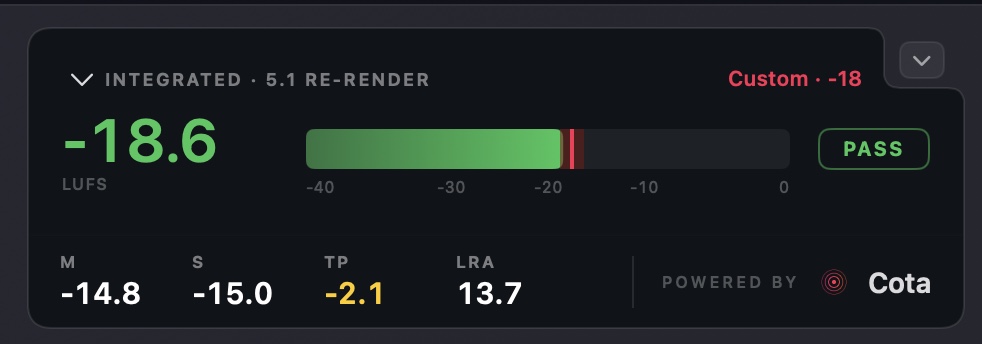
The main figure is the integrated loudness — here measured on a 5.1 re-render — on a live meter against your chosen delivery target, with a PASS / FAIL badge. Beneath it are the momentary (M), short-term (S), true peak (TP) and loudness range (LRA) readouts.
Powered by Cota
New in Orbit 1.5.2
The footer loudness section has been restyled and rebuilt to display Powered by Cota.
Cota is our dedicated loudness plugin and framework. Orbit 1.5.2 embeds Cota's engine and brings its look, feel and clarity into the footer, so you get clearer loudness information at all times.
On immersive loudness
Because Orbit uses its own renderer, loudness figures won't line up perfectly with another renderer such as the Dolby Atmos Renderer — that's the nature of immersive, so test on every renderer you can. For Atmos-specific delivery, make the final check against official Dolby tools (or Cota, once available, on a 5.1 output from the Dolby Atmos Renderer). Orbit's loudness is verified against the standard tests defined in ITU-R BS.1770, EBU R128 and more.
Delivery targets
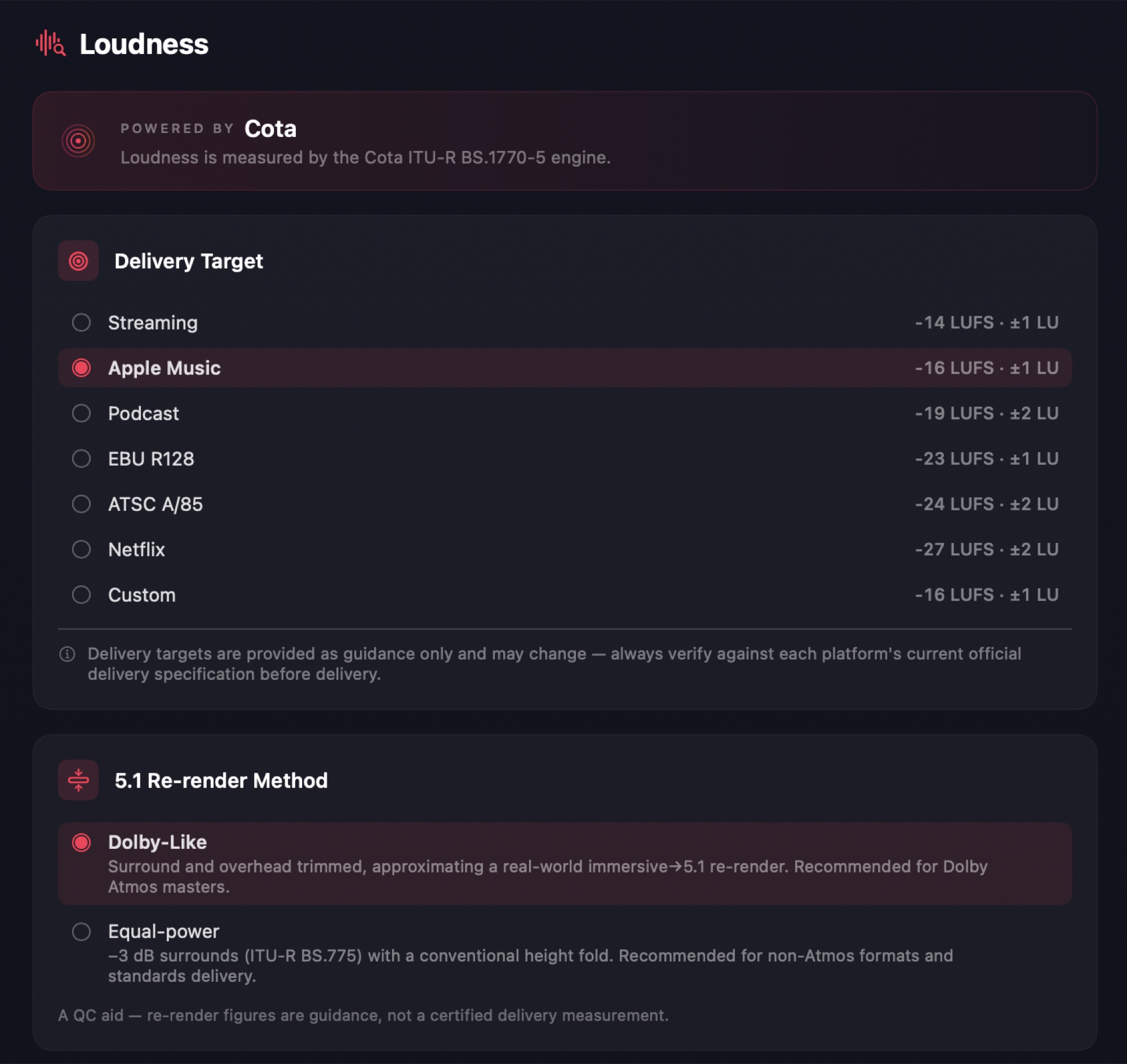
Pick a Delivery Target in Preferences → Loudness to check your master against a platform's loudness spec. Each target shows its integrated-loudness aim and tolerance:
| Target | Integrated | Tolerance |
|---|---|---|
| Streaming | −14 LUFS | ±1 LU |
| Apple Music | −16 LUFS | ±1 LU |
| Immersive | −18 LUFS | ±1 LU |
| Podcast | −19 LUFS | ±2 LU |
| EBU R128 | −23 LUFS | ±1 LU |
| ATSC A/85 | −24 LUFS | ±2 LU |
| Netflix | −27 LUFS | ±2 LU |
| Your custom targets | your value | ±1 LU, editable |
Guidance only
Delivery targets are provided as guidance only and may change — always verify against each platform's current official delivery specification before delivery.
Custom targets
New in 1.6.0 (beta)
Custom targets have names, and you can keep as many as you need.
Under Custom Targets, click Add Custom Target, give it a Name and a level in LUFS. Each custom target appears in Delivery Target alongside the presets — select it there to use it — and you set its pass range in Pass Range like any other target.
Pass range
New in 1.6.0 (beta)
Every delivery target has its own editable pass range, and the range no longer has to be symmetric.
Pass Range edits the band for the selected target:
- Pass down to and Pass up to — how far below and above the target still passes, in LU. They can differ.
- Warn margin — how far beyond the pass range reads as a warning rather than a fail.
- No minimum — anything up to the upper bound passes. No maximum — anything from the lower bound up passes.
The result reads Pass (green) inside the range, Warn (amber) beyond it by up to the warn margin, and Fail (red) past that. A target whose band you've changed is marked EDITED in the Delivery Target list; Reset to spec puts it back (Reset for a custom target).
Reset before you deliver
Delivery specs publish symmetric bands. Edit them for a QC pass, and reset before you deliver.
The Analyser View's Loudness module draws the programme's loudness over time against the current target's pass band.
5.1 re-render method
Most delivery specs measure loudness on a 5.1 re-render of an immersive master (for example Netflix's Dolby Atmos home-mix requirements). Choose how that fold is made:
- Dolby-Like — surround and overhead trimmed, approximating a real-world immersive → 5.1 re-render. Recommended for immersive masters.
- Equal-power — −3 dB surrounds (ITU-R BS.775) with a conventional height fold. Recommended for non-Atmos formats and standards delivery.
The re-render is a QC aid — the figures are guidance, not a certified delivery measurement.
Related
- Meters & Levels — the per-channel level meters and meter scales.
- QC PDF Report — measured loudness in the exported report.
- Metering preferences — meter scale, panning method, and loudness options.
- Analyser View — the loudness journey and big-number loudness tiles.
- Cota — the loudness plugin and framework Orbit's engine is based on.